

Order management is the process that helps sales made from a store or ecommerce flow naturally: reserving the product, shipping or picking up the items, handling returns, or canceling products within a sale. In other words, the entire natural life cycle a physical or online sale can go through.
What’s new in order management:
1. Ecommerce sales synchronization:
Until now, Stockagile did not update ecommerce sales. With this new feature, every time you make a change to an order coming from an online channel (WooCommerce, Shopify, Prestashop, or Amazon), the changes are automatically applied to that channel, unifying all your management in Stockagile.
2. Order delivery status flow:
With the new order management, it will be much easier to understand where an order’s stock is at any given moment. The new order management splits a purchase into one or more deliveries, where a delivery is simply the handling of one or more products within a sale.
Deliveries will always have one of the following statuses:
- Pending: the very first status when the sale is created; it does not involve any stock movement.
- Reserved: when the user wants to reserve the product’s stock. For ecommerce sales, if the sale has been paid, this is the status the sale is created with.
- Picked up: when the stock leaves our company because the customer has taken the products, in the vast majority of cases, when the customer buys in the physical store.
- Shipped: when the stock leaves our company, but not because the customer came to pick up the products, rather because we send the products to their address. In the vast majority of cases, when the customer buys in the online store.
- Return (in progress): when a customer notifies us that they are returning products but we have not received them yet. This status does not change the products’ stock.
- Returned: when a product is received as a result of the return described above. In this case, the stock is added back.
- Canceled: when the user notifies us that a previously purchased product needs to be removed from the sale, so that it no longer counts toward the sale total.
Illustrative image of all the delivery statuses for Stockagile sales.
To manage delivery statuses, you just need to click the buttons in the top right corner of the shipments.
Example of changing an order’s status from pending to reserved.
3. Change the order’s warehouse:
With the new order management feature, the same order can be processed from any location configured in Stockagile. For example, in the case of an online sale containing 2 products, you can ship one from the store and the other from the warehouse; or ship a product from the warehouse and, later, have the return sent directly back to the store.
To edit the delivery location, all you need to do is tap the warehouse selector while editing the delivery status.
Example of changing the warehouse in a sale’s delivery.
4. Add products to a sale:
This feature lets you add one or more products to a sale that has already been created. This way we can, for example, handle exchanges when processing a return or edit a reserved sale to add more products to it.
To add products to a sale, all you need to do is click the “Add products” button at the top of the screen.
Image of a sale with one shipment and one pickup, highlighting the add products button.
5. New refund management:
With this update you can manage returns and refunds separately. In other words, a return does not necessarily have to entail a refund, nor does a refund have to be tied to a return.
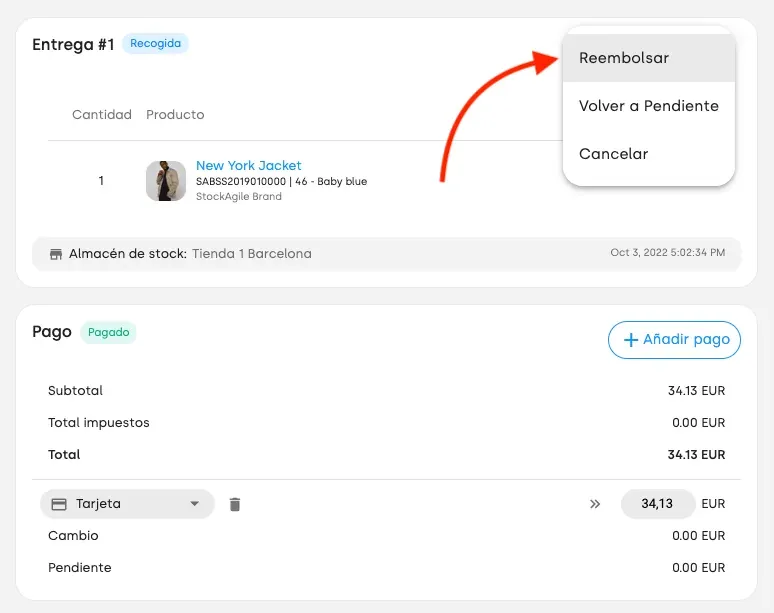
Starting a refund for a picked-up delivery
Editing the refund amount for a sale.
Summary of a sale with a picked-up shipment and a refund
6. New interface for customer management:
This new feature also redesigns the way sales are assigned to customers.
Image of the new customer assignment card