

More and more brands and businesses are using Instagram Shopping to sell their products. But why has Instagram become such a popular platform for online selling? The answer is simple: most people spend a lot of time browsing Instagram, and it’s a platform where a great deal of visual information is shared, on top of having more than a billion active users. That makes it a perfect place for businesses to showcase their products in an appealing way and grab the attention of potential customers.
In this article we’ll walk you through everything you need to know to set up an Instagram store and make the most of it. Just follow the steps!
1. Create a business account
The first step is to convert your personal account into a business account. This gives you access to the special Instagram Shopping tools and features that will help you sell on the platform.
To create a business account, just follow these steps:
- Open your Instagram account and go to your profile.
- Tap the three horizontal lines in the top-right corner of the screen.
- Select “Settings” at the bottom of the screen.
- Tap “Account” and then “Switch to professional account”.
Follow the instructions to finish setting up your business account.
Once you’ve done that, you’ll have access to handy tools to promote your Instagram store. For example, you’ll be able to add contact buttons, such as “Call” or “Send message”, so customers can reach you directly. You’ll also be able to create and promote posts and ads.
2. Turn on Instagram Shopping
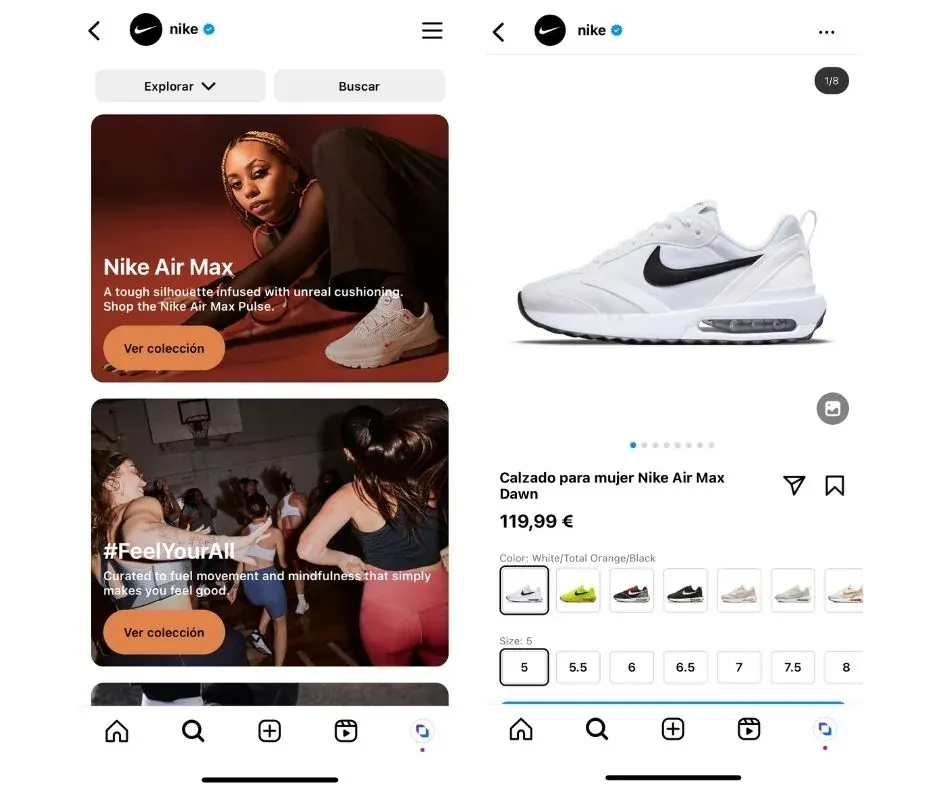
Once you’ve completed the previous step, the next one is to turn on Instagram Shopping. This feature lets you create a store within your Instagram profile, where your followers can buy your products directly from the platform, without ever having to leave it.
To do this, go to Settings in your Instagram profile and select the “Shopping” option. Follow the steps provided to review and accept the Instagram Shopping terms and conditions.
3. Meet Instagram’s requirements
To set up a store on Instagram, you need to meet the following requirements, commerce policies and the platform’s community guidelines, as well as Instagram’s terms of use and community guidelines. If you break these policies, you can lose access to your social profiles and even have your account disabled.
4. Sell products, not services
You can’t offer services on Instagram, only physical products. So keep in mind that if your business doesn’t sell products, such as clothing items, you won’t be able to sell through the platform.
5. Connect your Instagram account to your Facebook page
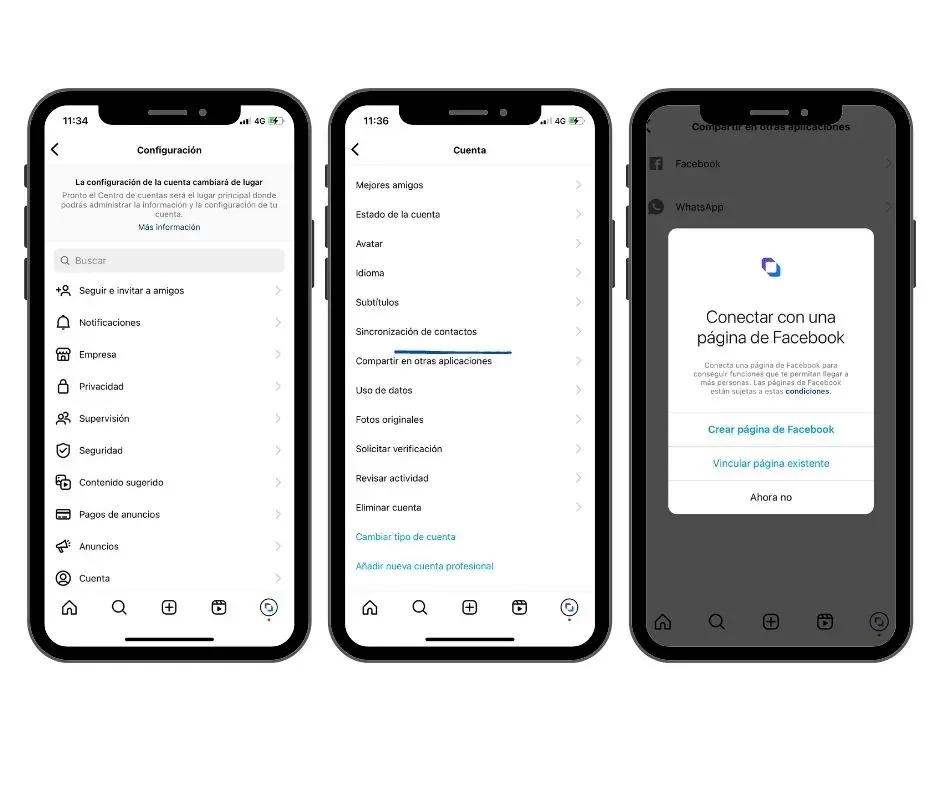
From your Instagram profile, tap the three horizontal lines in the top-right corner, then “Settings” and “Account”. Under “Sharing to other apps”, select “Facebook” and follow the instructions to connect your account to an existing Facebook page or create a new one.
Once you’ve completed the previous steps, you can turn on Instagram Shopping through your account settings. Just go to Settings > Business > Shopping on Instagram and follow the instructions to connect your Instagram account to a product catalog on Facebook.
6. Create your product catalog
To add products to Instagram Shopping, you need to create a product catalog on your Facebook page using Facebook Business Manager or through an e-commerce platform, such as Shopify, PrestaShop or WooCommerce. In either case, it’s important that the product catalog consists of a list of products with prices and descriptions, plus an inventory.

To create a product catalog, do the following:
- Log in to your Facebook Business Manager account and select the “Catalogs” option in the main menu.
- Click the “Create catalog” button and choose the “Product catalog” option.
- Give your catalog a name and select the currency and language you want to use.
- Set up your catalog’s data source. You can upload your products manually or connect your catalog to an external data source such as a CSV file or an online store.
- Add detailed information about your products, such as name, description, price, images and other details.
- Check that all the information in your catalog is correct and complete.
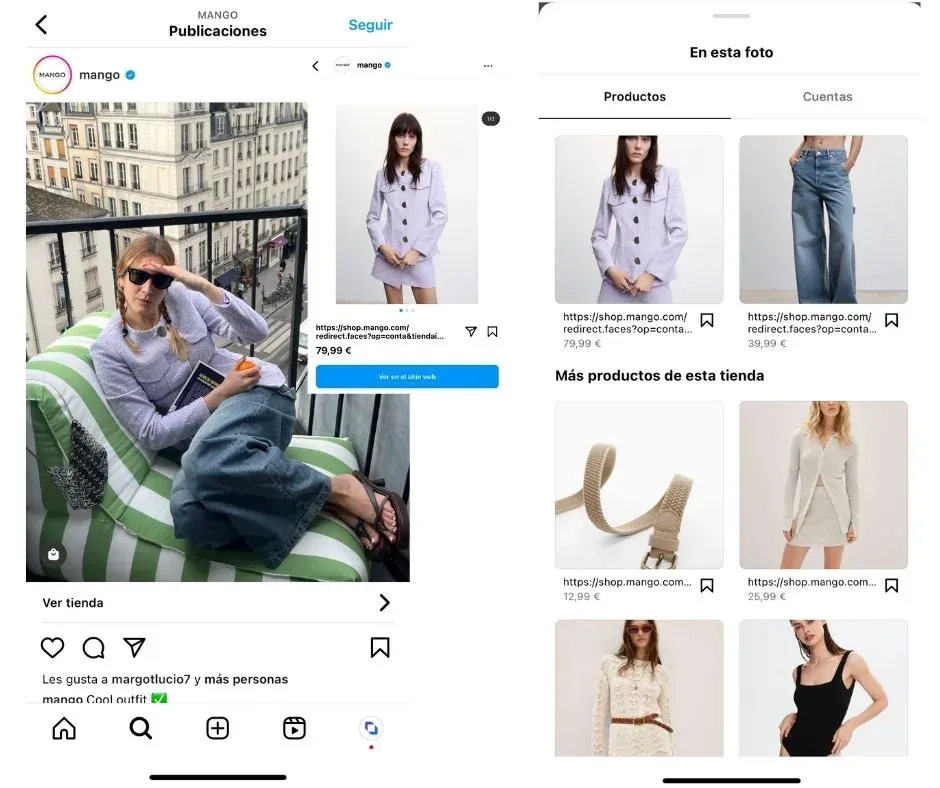
Once you’ve created your product catalog, you’ll be able to tag your products in your Instagram posts and stories. To do so, simply select the “Tag products” option when creating a post or story and choose the products you want to tag.
When you do, the system will display a white shopping-bag icon**,** which tells users that the post (whether it’s a story, feed post or reel) contains items available to buy. When they tap this icon, a window will appear with detailed product information. In addition, selecting an item will redirect them to the online store to complete the purchase.
Remember that it’s important to keep your catalog updated with available products and prices, so your customers can make purchases without any trouble.
7. Submit your account for review
The final step is to submit your account for review. Once you’ve set up Instagram Shopping and added the products from your catalog, you’ll need to wait for Instagram to approve your account. This approval can take a few days and will verify that you meet all the platform’s requirements.
To do so, simply click “Submit for review” in the “Shopping” section within your Instagram profile settings.
8. Turn on shopping in your Instagram store
All that’s left is to turn on shopping in your posts. To do so, follow these steps:
- Open the Instagram app on your mobile device and go to your profile.
- Tap the three-horizontal-lines icon in the top-right corner of the screen.
- Select “Settings” and then tap “Shopping”.
- Select “Continue” and read and accept Instagram’s terms and conditions.
- Choose the catalog you want to use for shopping on Instagram.
- Tap “Done” and that’s it! You’ll now be able to tag your products in your posts and your customers will be able to buy directly from the app.
Benefits of using Instagram Shopping
Greater visibility and reach
To start with, the Instagram Shopping Checkout tool gives you greater visibility on the platform. As a social network with millions of daily active users, Instagram lets you reach a much wider audience that would otherwise be hard to access. On top of that, this tool lets you tag your products in your posts, reels and stories, so your followers can access them directly and buy them.
More sales
Another of the great advantages Instagram Shopping offers is how easy and convenient it makes things for your customers. With this feature, the buying process becomes much simpler and faster, since they don’t have to leave the platform to complete the transaction. That eliminates any problem that might come up, such as a slow-loading link redirecting to your store. This will undoubtedly boost your customers’ satisfaction, which translates into more sales and greater customer loyalty.
Better tracking thanks to its analytics
Instagram Shopping Checkout gives you access to statistics and data about your sales and customers, letting you better understand their behavior and preferences, and adjust your offering and marketing strategies accordingly.
More reach for your posts
Once you turn on Instagram Shopping features, your items will appear both in “Explore” and in the “Shop” option, generating greater reach compared to accounts that don’t use the Instagram Shopping tool.
Make the most of your Instagram store with these marketing strategies:
A well-designed, attractive profile is essential for building trust with your potential customers and increasing your sales on the platform.
To optimize your Instagram store profile and go beyond simply displaying your catalogs, follow these tips:
1. Add a high-quality profile photo:
This photo should represent your brand clearly and attractively. Make sure it’s a high-resolution image with a suitable size so it doesn’t look pixelated. You can use your company logo, if you have one. The goal is for it to be easy to read and identify with your brand.
2. Choose a clear, easy-to-remember username:
Your username should be easy to remember and related to your brand. If possible, choose the same username you use on other social networks so customers can find you easily. The best option is to use your store’s name, without variations.
3. Write a short, clear bio:
Your bio should be brief but informative. Explain who you are, what you sell and what customers can expect from your store. Use a friendly, approachable tone to connect with your potential customers.
4. Use Instagram ads:
Instagram ads are a great way to reach a wider audience and increase your sales. Use your audience’s demographic and behavioral data to create ads that resonate with them.
5. Offer discounts and promotions:
Special offers can encourage customers to make a purchase. Offer exclusive discounts and promotions for your Instagram followers.
6. Work on your brand’s identity and values:
Don’t limit yourself to creating catalogs with the sole aim of selling your products. Selling is very important, but you shouldn’t forget to work on building community and providing valuable content that reflects your business’s values. To achieve this, you can share information that’s useful to your users, create special posts on key dates, use storytelling, and create polls and questions to stay in touch with your audience and generate engagement.
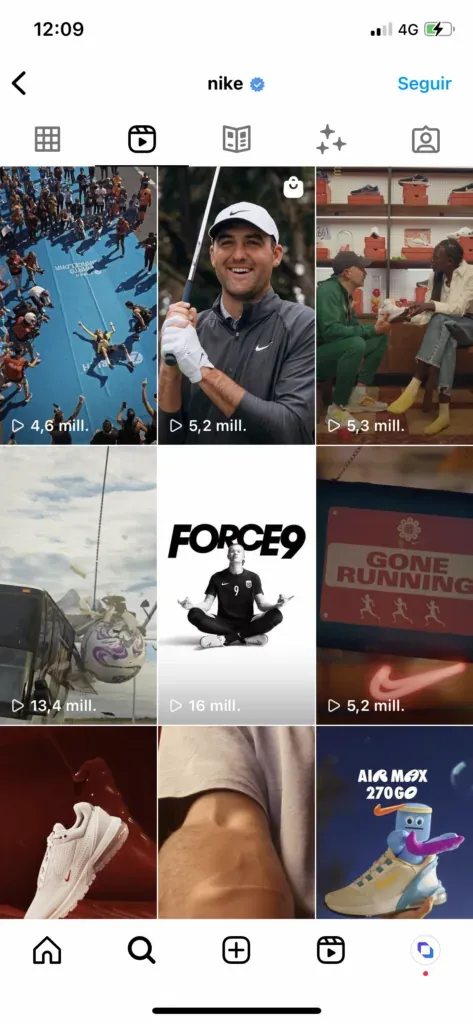
An example of a store with a well-designed Instagram profile is the sports brand Nike. Nike’s Instagram account has more than 190 million followers and its profile is clear and attractive. Its profile photo is a simple brand logo, its username is easy to remember and its bio is brief but informative. They also add a direct link to their website to make shopping easier.
What’s more, they use storytelling built around the stories of different characters and profiles, connecting them with a particular product from their catalog.
Storytelling is a marketing technique that consists of telling stories that involve the audience, creating an emotional connection between the brand and the user.
This technique is based on the idea that people are more likely to remember information when it’s presented as a story rather than as dry facts and statistics. When brands use storytelling in their marketing strategy, they can create an emotional bond with their audience, which can increase loyalty and foster a deeper connection with the brand. Users can see themselves reflected in the stories being told, feel empathy toward the characters and experience a sense of familiarity and closeness with the brand.
You can draw inspiration from this case, and the many others out there, to design your profile and make your Instagram store a success.
Discover how Stockagile can help you set up your Instagram store
Here are some of the things Stockagile can do for you when it comes to setting up your Instagram Shopping store:
1. Manage orders and shipments:
Let’s say you sell products through Instagram Shopping and receive several orders a day. If you use your e-commerce store as a bridge, Stockagile lets you manage your orders centrally and keep track of your product shipments. You can easily check the status of each order, mark them as shipped once they’ve been dispatched, and provide tracking information to your customers.
2. Centralized stock management:
Stockagile integrates with your e-commerce store so information is updated in real time based on the stock movements happening across all your sales channels. This way, you’ll always know the availability of your products and the state of your inventory at any given moment.
3. Sales analytics:
If you use Stockagile, you’ll be able to obtain valuable data about your sales performance, such as the number of orders, total sales value and conversion rates. With this information, you’ll be able to make informed decisions about how to improve your sales strategy on Instagram Shopping.
4. Create a product catalog on Instagram Shopping:
Imagine you have an online store with lots of products and you want to add them all to your Instagram Shopping catalog. Instead of doing it manually, you can use Stockagile to import your entire product inventory and create an Instagram Shopping catalog easily. This will save you a lot of time and effort. You can do it through partner platforms (such as Shopify), through an Excel file or even through the Meta pixel.
Now you know everything you need to set up your Instagram store and start selling your products! Shall we get started?