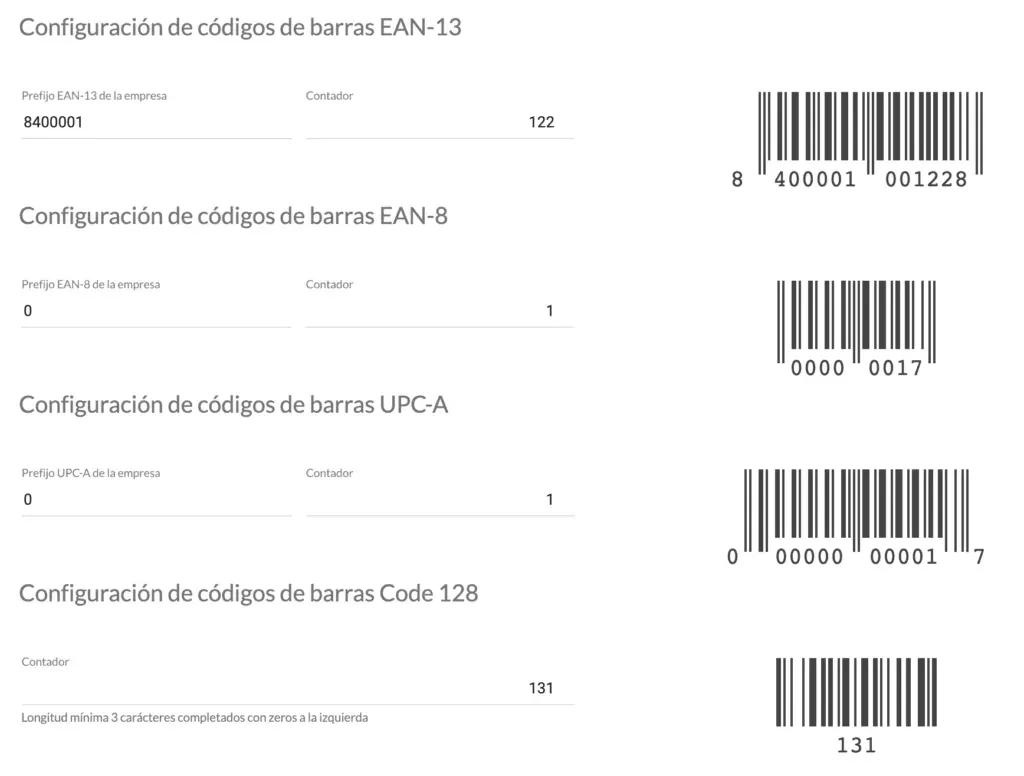
At StockAgile we work with several types of barcodes: EAN-13, EAN-8, UPC-A and CODE-128.
With EAN and UPC codes you can only use numbers, no characters and no letters.
There are two types of EAN:
EAN (European Article Number) was first adopted by European countries, but today it’s used by almost every country except the United States and Canada, which use UPC.
- EAN-13
As the name suggests, the code is made up of 13 digits: 1 digit on the left, 6 in the middle and 6 on the right. Two different products can never share the same code.
The barcode is divided into 4 parts.
The first digits identify the country that issued the product. The code is structured into the country-of-origin number, the manufacturer number and the product identifier number.
- EAN-8
It works the same way as EAN-13, but saves space since it only contains 8 digits. It’s used for retail products such as sweets, cigarettes and other small items.
The eight digits are split into two blocks of 4. Two of them indicate the country, 5 identify the product and one is the check digit.
- UPC-A
This is the most widely used code in the United States and Canada, typically for supermarkets and retail products.
The code has 12 digits. It starts with a number that classifies the product (for example, whether it’s a pharmacy item, a retail product, etc.). Then comes the manufacturer and product information. The final digit is the check digit.
- CODE-128
It’s mainly used in logistics and warehousing. It’s a highly versatile code that supports symbols, numbers and letters, and can hold a large amount of data.
The barcode has 6 sections. The first and last sections are quiet zones that reference other elements of the code. Each character is made up of 3 bars and 3 spaces.
Setting up barcodes in StockAgile
To create the different barcodes in StockAgile, you can configure EAN-13, EAN-8 and UPC-A with:
- The prefix is the part that belongs to the company that has acquired the range of numbers from an organization such as GS1.
- The counter is the auto-incrementing number of the next code the program will generate.
For CODE-128, on the other hand, there is no prefix to configure.