
Let the system do
the repetitive work.
Rules that react to every event —a sale, a receipt, a low-stock alert—, plus webhooks and an API to connect your stack. What you do by hand today, copying data from one screen to another, now happens on its own.
20-min personalized demo · No commitment · Works with n8n, Zapier and Make

Retail brands already running on Stockagile












Fewer manual tasks. Fewer errors. More time to sell.
What changes the day every event in your operation triggers the right action, on its own.
Rules that react on their own
If stock drops below the minimum, it creates the purchase order. If a sale comes in, it flags it. Define the rule once and it runs without anyone kicking it off.

Low stock restocks itself
When a product crosses its minimum, the system drafts the PO to your usual supplier. No stockouts from forgetting, no orders placed too late.

Your stack, truly connected
Every sale and every stock change travels to your CRM, your BI or your ERP the moment it happens. No more Monday-morning exports.
No coding the basics
Rules and webhooks are set up from the panel, no code. The API is waiting for when your technical team wants to go further.
−15 h/wk
you stop copying data by hand
0
manual exports to feed your BI
+1,200
stores running
If this happens, do that. Defined once, run every time.
Build rules on the events in your operation: stock below minimum, sale closed, order created, receipt confirmed. Each rule reacts the moment it happens and fires the action —create a PO, alert the team, launch a flow— without anyone activating it.
From presale to purchase order, hands-free.
When a customer places a presale in ecommerce and there's no stock in the warehouse, Stockagile detects the event and automatically launches the purchase order to the right supplier. The stock arrives, it's received and the order is fulfilled — with no one deciding it manually.
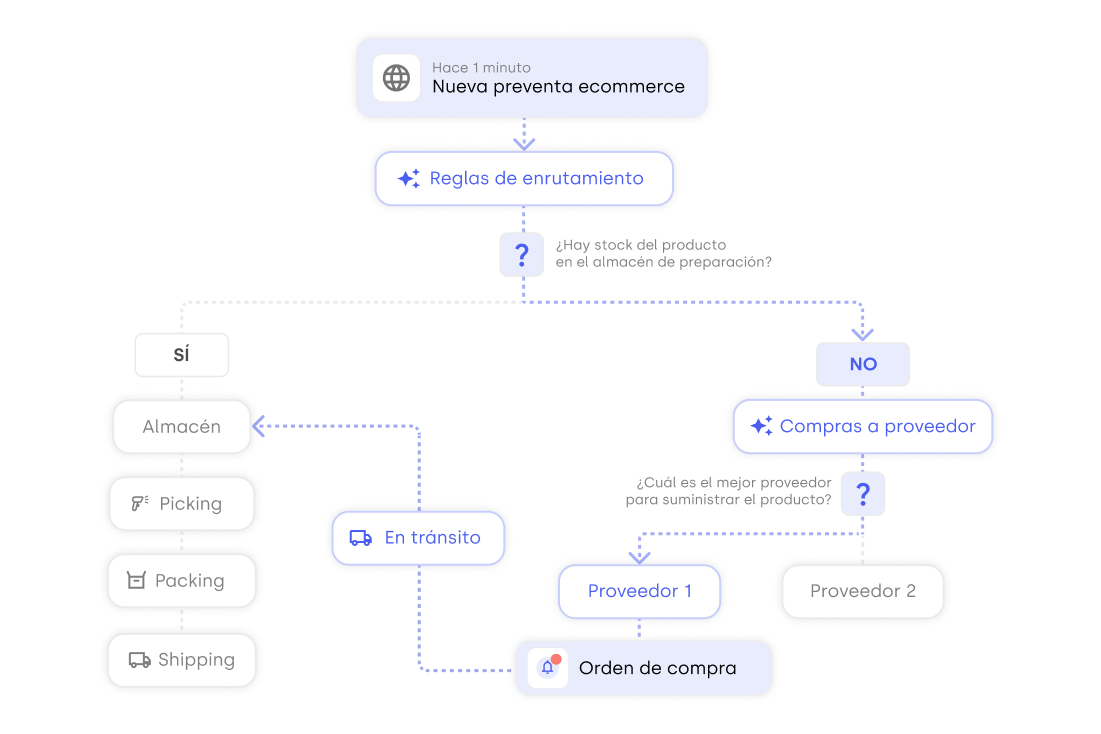
Everything that happens in your store, logged as an event.
Sales, receipts, transfers, stock changes, online orders and customers — all recorded as an event with its type, author and time. It's the feed that powers your rules and your webhooks: what triggered each flow, when and with what result, always auditable.
See how it worksConnect your stack. One event is enough for everything else to react.
Every event reaches your endpoint the instant it happens, with the full payload and the headers you define. They're standard HTTP: plug them into n8n, Zapier, Make or your microservice without a line of code. And when you need to go further, the documented REST API lets you read and write stock, orders and sales.
See how it worksIf a flow fails, you'll know. And it gets processed again.
Every event stays in the integration log with its status —pending, processing, processed or failed—, its retries and the failure detail. If your endpoint was down, mark it as pending and Stockagile requeues it. Enable, pause or edit any webhook from the panel, without touching code.
See how it worksCustomer stories from teams that let the system work for them.

Retail · Accessories
«Thanks to Stockagile I can quickly tell my accountant exactly how much capital I have tied up in products. It’s a fantastic tool — it makes my life easier and saves me a huge amount of time.»
Cristina Canales · Owner
+1,200
stores running

An unbeatable experience
It's been a total success! It was the tool I needed for my business. It works perfectly, you can tell it's fully oriented to fashion businesses. Agile and intuitive, you don't need to spend many hours to learn how to use it. Besides the fact that every section is explained in the Academy, there are videos on YouTube explaining how to use it. Support is fast and effective. It's reassuring to know there's a good team behind it that will solve your questions without long waits. The integration with our online store and the backup of the data from our previous software was a walk in the park, and that's despite the fact that we didn't hire the initial help and did everything on our own, that's how easy it is! In the time we've been using it I couldn't point out a single negative, everything has been positive. It's the best investment we've made!
Elena · on Trustpilot · translated

−70%
in operational errors
All the repetitive work in your operation. Automated and traced.
From rules to the API, every piece in one place. Open each block to see how it works.
Rules and triggers
Stock rules
If stock < min → create a PO or alert the team, on its own.
Automatic restocking
Refill based on sales and sell-through, without kicking it off by hand.
Alerts and notifications
Notify the team the moment an event crosses your threshold.
Events and webhooks
Works even better alongside the rest of your operations
Automations react to what happens in your inventory. Connect them with the rest of the system so everything moves on its own.
Purchasing
Buy on data: what, how much and from whom, at real cost.
Manufacturing
Bills of materials and production orders that feed your stock.
Planning
Replenish from the warehouse and buy before you run out.
Warehouse
Guided picking, packing and locations under control.
Orders
Every channel in one flow, with routing and returns.
Stores
Every sale updates stock, customer and till instantly.
Ecommerce
Shopify, WooCommerce and marketplaces in sync.
Wholesale
B2B portal, wholesale pricing and orders, with invoicing.
Frequently asked questions
Do I need to know how to code to automate the basics?
No. Rules and webhooks are created from the Stockagile panel: you pick the event (low stock, sale closed, order created), the action or destination URL and any headers you need. Not a line of code. The REST API is there for when your technical team wants to build something custom, but you don't need it to get started.
What kind of rules can I set up?
Rules that react to the events in your operation. The most used one: if a product's stock drops below its minimum, create the purchase order to the supplier or alert the purchasing team. Also: when a sale closes, send the data to your BI; when an online order comes in, log it in your CRM; when a receipt is confirmed, notify the warehouse.
How do I connect Stockagile with n8n, Zapier or Make?
Stockagile's webhooks are standard HTTP endpoints. You copy the URL your automation tool gives you (n8n, Zapier, Make, Pipedream or your own stack), paste it into the webhook settings and pick the event that triggers it. From then on, every time that event happens, your flow runs. No proprietary connector, no middleware adapter.
Which events can I use as a trigger?
Retail sales, online orders, products (including 'stock changed'), purchase orders, transfers and customers — each domain with its variants (created, updated, deleted, restored). The 'stock changed' event is the most used one for keeping catalog feeds, ads and BI dashboards up to date without polling.
What's the point of the REST API if I already have webhooks?
Webhooks notify you when something happens (push); the API lets you read and write whenever you want (pull). With the documented REST API —per-company token authentication, docs in Swagger and Redoc— your team reads stock, orders, sales and products, connects your BI or builds custom integrations. The two pieces complement each other.
What happens if a flow fails or my endpoint is down?
Every event stays in the integration event log with its status (pending, processing, processed or failed). If the destination is down, the system retries with exponential backoff until the endpoint responds. If it keeps failing, you get an alert. You can review the log, see the exact payload that was attempted and relaunch it manually whenever you want.
Ready to stop keying in data by hand?
We'll show you how automations fit with your real operation, in a personalized 20-minute demo.
No lock-in · no per-sale commissions · migration included